Best VST Plugins for Techno & Hardtek
Here are the VST plugins we use and recommend — the list obviously isn't exhaustive, it all depends on how you work and the music style you produce
Our go-to DAW is Ableton Live 12. If you're not sure what a DAW or a VST is, there's a breakdown further down the page
You'll find plenty of free plugins below, but don't sleep on the stock plugins that come with your DAW — they're seriously powerful, and most of the time you really don't need anything else.
One key thing to keep in mind — if you can't get that polished, professional sound you hear from your favourite artists, it's not because you're missing the right VSTs, the right DAW, or some expensive analogue synth. It just takes years to really get a handle on music production, sound design, mixing and mastering. Bottom line: save your money — with free plugins and your DAW's stock tools, you have everything you need to make a worldwide hit.
A word on your DAW's stock plugins — especially Ableton Live 12's, which are genuinely excellent. We say it a lot but it's true: before you go chasing third-party plugins, dig into what you already have. Live 12 ships with some seriously capable tools. Wavetable is a full-featured wavetable synth that sounds fantastic, Drift is a virtual analogue synth with real character, Meld does a great job on heavy bass and dark textures, and on the effects side, Echo is a top-tier delay with loads of personality. And the stock Compressor covers 90% of what you'll ever need. In 2026, Live 12's native plugins can hold their own against a lot of paid VSTs — so make the most of them.
Vital
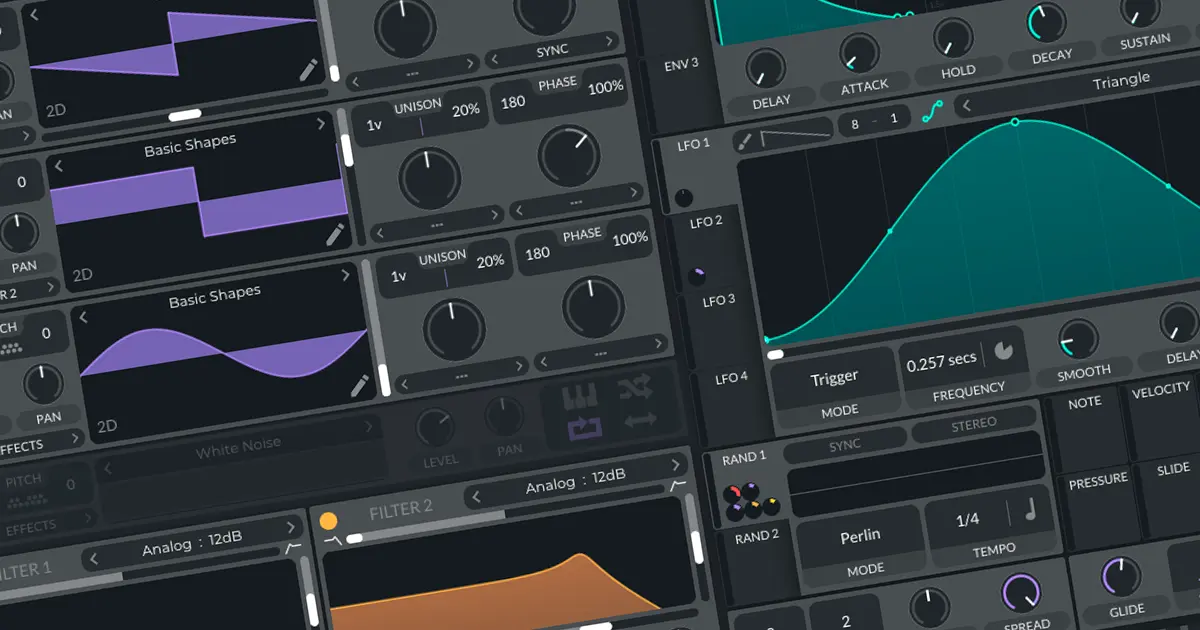
First thing's first — it's free. The sheer power of this synthesizer makes it genuinely hard to believe it costs nothing... so if you're just starting out, don't spend money on paid synths. Use Vital — it's highly visual and one of the best tools out there for learning and understanding synthesis.
Vital is a wavetable synth — which basically means it can shape sounds by starting from waveforms you can draw and animate over time, opening up a huge range of sonic possibilities. The interface is clean and everything is visible at a glance: oscillators, envelopes, LFOs, built-in effects. It's genuinely designed to help you understand what you're doing, not just tweak knobs blindly. It runs on Mac, Windows and Linux, installs in minutes, and the online community has thousands of free presets to learn from or just draw inspiration from. In 2026 it's still very much relevant and remains the undisputed benchmark in the "free plugin that puts paid ones to shame" category.
Minimoog - UAD
If we're talking legend, the Minimoog is in a class of its own. Bob Moog's synth literally defined the sound of several decades of music — from 70s prog rock to house and techno, hip-hop and beyond. And the good news is that Universal Audio have done a truly impressive job with their emulation. The sound is fat, warm and organic — exactly what you expect from a Moog.
You'll need UAD hardware or a subscription to UAD Spark to run it, which makes it a paid plugin with a fairly specific ecosystem. But if you're after analogue bass that drips with character, leads that cut straight through a mix, or textures that have that je-ne-sais-quoi — alive, slightly imperfect in the best possible way — the Minimoog UAD is absolutely worth the investment. It's one of those plugins you load up and never put away.
Soothe 2 - oeksound
Soothe 2 is the kind of plugin that changes the way you mix — and once you've used it, going back feels impossible. Built by Finnish studio oeksound, it's a dynamic resonance suppressor that intelligently and transparently tames unwanted harshness in a signal. In plain terms: it listens for what's harsh, what's fatiguing, what's starting to clip, and steps in surgically — only when it needs to.
Where a standard EQ cuts a frequency all the time, Soothe 2 only kicks in when things get out of hand. The result? Vocals that breathe without losing presence, hi-hats that stop piercing your ears, guitars that sit in the mix without fighting for space. It's become a go-to on professional sessions over the last few years, and in 2026 it's still the reference in its category. Not cheap (around £130–180), but it's an investment you'll hear immediately.
FAQ - VST Plugins
What exactly is a VST plugin? ↓
VST stands for Virtual Studio Technology, a format created by Steinberg back in the 90s. In practice, it's software you install inside your DAW to add virtual instruments (synths, pianos, drum machines…) or effects (reverb, compressor, EQ…). These days pretty much every DAW supports them, whether you're on Ableton, Logic, FL Studio or anything else.
Do you need lots of VSTs to produce well? ↓
No — and this is probably the most common trap when you're starting out. Having 50 plugins is no substitute for hours spent really understanding one synth or one compressor. The best producers often work with very few tools but know them inside out. Better to properly master Vital and your DAW's stock plugins than to pile up VSTs you'll never actually dig into.
Free vs paid VSTs what's the real difference? ↓
In 2026, the gap has genuinely narrowed. Free plugins like Vital or Ableton Live 12's stock tools sound seriously good. Paid plugins often bring more detailed modelling, a more refined interface, or a specific character that's hard to replicate — that's the case with the Minimoog UAD or Soothe 2. But honestly, a great track can absolutely be made with 100% free tools if you know how to use them.
VST2, VST3, AU, AAX… what are all these formats? ↓
These are different plugin formats depending on your DAW and OS. VST3 is the current standard on Windows and Linux, AU (Audio Unit) is the native format on Mac, and AAX is exclusive to Pro Tools. In practice most plugins are available in all formats. In 2026, VST2 is slowly being phased out — if your DAW still supports it that's fine, but go for VST3 for any new installs.